The End of an Era: Pivotal Tracker Shuts Down
Pivotal Tracker, a long-standing tool in the agile and iterative development world, is officially going out of business. VMware Tanzu (previously under Broadcom and Pivotal Labs) has announced that Pivotal Tracker reached its end-of-life (EOL) on April 30, 2025.
For many software teams, this announcement has triggered both nostalgia and concern. Pivotal Tracker has been prized for its story-based workflow, focus on iteration velocity, backlog management, and its opinionated way of steering teams toward certain agile practices. Thus, its closure means not just losing a tool, but losing a set of expectations, habits, and project history.
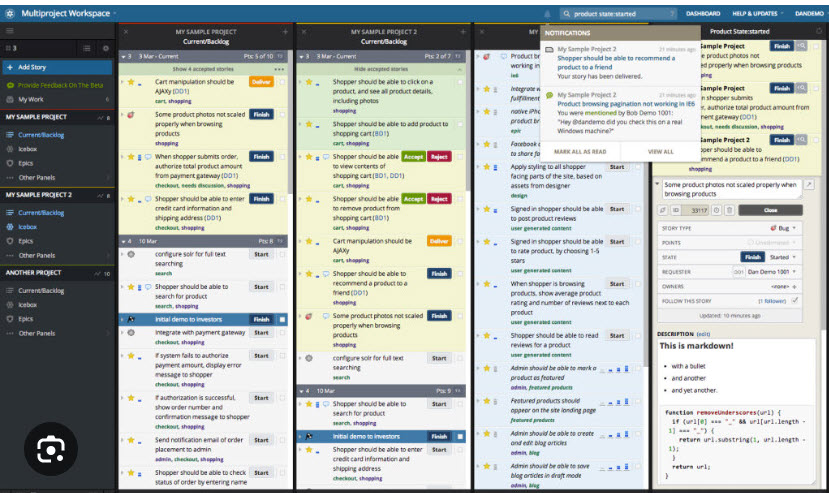
This is the dashboard webpage that made it so popular.
What Happened & What It Means
Here are some of the key points about the shutdown and its implications:
-
Timeline: The shutdown was announced, and the official EOL (end-of-life) date is April 30, 2025. After that, standard and startup plans are no longer supported, and the service will be discontinued.
-
Who’s affected: Teams using non-enterprise plans are particularly affected. Some reports say “for everyone except enterprise customers,” though even enterprise users will need to plan ahead.
-
Data and migration challenges: Users are scrambling to export data (stories, backlog, epics, comments) before the shutdown. Some tools or services are being built (or have been built) to help with migration.
-
Why this happened: Several sources point to Pivotal Tracker’s parent organizations shifting corporate priorities. After acquisitions, product line changes, and maybe declining usage or strategic misalignment, they decided to retire the tool.
-
What to do now: For teams still using Pivotal Tracker, now is the time to evaluate alternatives, plan migration, ensure continuity, and preserve as much project history as possible. The longer one waits, the harder migration and adjustment could be.
Alternatives for Agile Project Management
Here are several tools that are good alternatives to Pivotal Tracker. Some are more similar than others; some emphasize flexibility, reporting, enterprise scale, simplicity, or integrations.
| Tool | What It’s Good At / Why Consider It | Key Features to Compare |
|---|---|---|
| Website-Garden.com (make your websites grow) |
This website was created by a former and avid user of Pivotal-Tracker. Tasks are added to a list of tasks, and be dragged and dropped to re-order them. website-garden.com |
In addition to tracking tasks, this site is about to open up to allow you to hire freelance/workers outside of your company to perform some of your tasks for you (similar to Fiverr, Konker, Upworks and Freelancer).
The site also tracks your website and domains, and reports weekly SEO statistics and monitors uptime (able to send you an email or test if your site goes down). |
| Shortcut (formerly known as Clubhouse) | Probably the closest in spirit for many: story-based product management with agile workflows. Designed to be simple but powerful. shortcut.com | Iterations (sprints), backlog, epics & stories, integrations (GitHub, GitLab, Slack etc.), roadmaps, customizable workflows. |
| Zoho Sprints | Zoho is actively positioning this as a Pivotal Tracker replacement; they even offer assistance with migration. Zoho | Agile reports, release / sprint boards, epics, Kanban & Scrum boards, custom fields, mobile apps, integration with Zoho suite. |
| Jira (Atlassian) | Very mature; extremely flexible; scales from small to large. Probably more complexity than some teams need. | Scrum/Kanban boards, backlog management, reporting (burndown charts etc.), many add-ons, strong integration ecosystem. |
| Asana | Easier learning curve; good for teams that want simplicity + collaboration, maybe less “engineering-centric.” | Task management across teams, timelines, dependencies, dashboards, automations, integrations. |
| Trello | Lightweight, visual; good for smaller teams or for non-engineering projects, or for simpler workflows. But perhaps a little too “lightweight.” |
Kanban boards, card attachments, checklists, power-ups (integrations), easy onboarding. |
| ClickUp | Highly customizable; you can adapt to many workflows; lots of features across docs, tasks, goals. | Multiple view types (list, board, calendar, etc.), goals or OKRs, docs/integration, time tracking, automations. |
| monday.com | Flexible platform; less prescriptive, more builder-friendly. Good if you want to customize heavily. | Custom workflows, dashboards, automations, visualizations, fairly intuitive interface. |
| Azure Boards | Excellent if you’re already in the Microsoft/Azure ecosystem; good for enterprise scale. | Deep integration with Azure DevOps, work items, backlog/sprint/kanban boards, reporting, permissions/scaling. |
| Open Source / Self-Hosted Options (e.g. Tuleap) | If you want control, customization, open source, or want to avoid vendor lock-in. | Kanban/Scrum support, issue tracking, release planning, risk management, sometimes code repository integrations. |
Tips for Choosing Your Replacement & Managing the Transition
Here are some steps / tips to make the transition smoother:
-
Inventory what your team uses now
What workflows, integrations, reports, metrics, and features are essential (e.g. backlogs, epics, story points, velocity, integrations with GitHub/GitLab or CI/CD, etc.)? Which ones are “nice to have”? -
Export everything you can
Before April 30, 2025, make sure you export all your data from Pivotal Tracker: stories, epics, comments, attachments, backlog history. Test to ensure you really have what you need. -
Trial alternatives early
Don’t wait until the last moment. Spin up trial accounts with several candidate tools, try importing some of your data (if possible), recreate a few recent sprints/backlogs and see how the team feels. -
Consider the learning curve & change management
Even changes that seem small (UI, terminology, workflows) can slow down teams initially. Build in time for training, adjustment, updating documentation, changing habits and possibly updating your continuous integration / development workflows. -
Plan for integrations / automations
If Pivotal Tracker was connected to other tools (e.g. code repos, CI/CD, chat/slack, issue trackers), you’ll want to ensure your new tool can replicate those, or that you can build replacement integrations. -
Preserve history / reports
Some reporting (velocity over time, cumulative flow, burndowns) depend on historical data. Make sure your replacement can accept old data (or you retain archived reports) to compare “before vs after”. -
Communicate with the team
Make sure everyone knows why the move is happening, what alternative tools are being considered, and invite feedback. Involving team members early helps reduce friction.
Conclusion
The retirement of Pivotal Tracker marks a significant shift for agile teams that have long depended on it. Though it’s sad to see a familiar tool go, the good news is there are many capable alternatives. The key will be careful planning, preserving data, and choosing a tool that aligns with your team’s workflows and culture.