Revolutionizing Home Living: Smart Tech for Home Improvements

1. Amazon Echo (Alexa): Amazon Echo, or Alexa, is a smart speaker device that answers questions, plays music, and controls other smart devices in the home. It uses voice recognition software and can also tell you traffic conditions, weather forecasts, play trivia games, and even narrize eBooks.

2. Google Home: Similar to Alexa, Google Home is a smart speaker and voice-activated assistant. This device can deliver news, set alarms, manage your smart home devices, and schedule appointments through Google Calendar.

3. Nest Learning Thermostat: The Nest Learning Thermostat is a smart home device that learns your habits and routines, thereby adjusting the temperature of your house accordingly to save energy and money.

4. Philips Hue Smart Bulbs: These smart bulbs allow you to control your home’s lighting via an app on your smartphone. They can be set to change color or brightness based on certain conditions or could be used as a security measure when you’re not home.

5. Ring Doorbell: This Wi-Fi-enabled video doorbell allows you to see, talk, and listen to anyone on your property via your smartphone, tablet, or computer. It offers a 1080p HD video with a wide-angle camera lens, infrared night vision, and adjustable motion detection.

6. iRobot Roomba: This smart vacuum cleaner can be scheduled to clean your house when you’re not home. It navigates around furniture and can even handle different floor types.

7. August Smart Lock: August Smart Lock allows keyless entrance to your house for you and your guests. You can control and monitor your door from anywhere, and can also keep track of who comes and goes.

8. Samsung Family Hub Refrigerator: This smart refrigerator has a tablet-like screen for setting reminders, creating grocery lists, and even streaming music. It also has cameras on the inside so you can check what you have or don’t have while you’re out shopping.

9. Tado Smart AC Control: This device makes your air conditioner smart. You can control your AC from anywhere with your smartphone.

10. Ecobee Switch+: Not only a smart light switch, but Ecobee Switch+ also comes with built-in Alexa. You can now ask Alexa for a weather forecast, news update, or even control other smart home devices.

These technological advancements provide users with added convenience, greater control, and significant energy savings. These devices also allow for easy customization of home environments, making them more efficient and comfortable.

Elevate Your Digital Footprint: Expanding Web Marketing Tactics

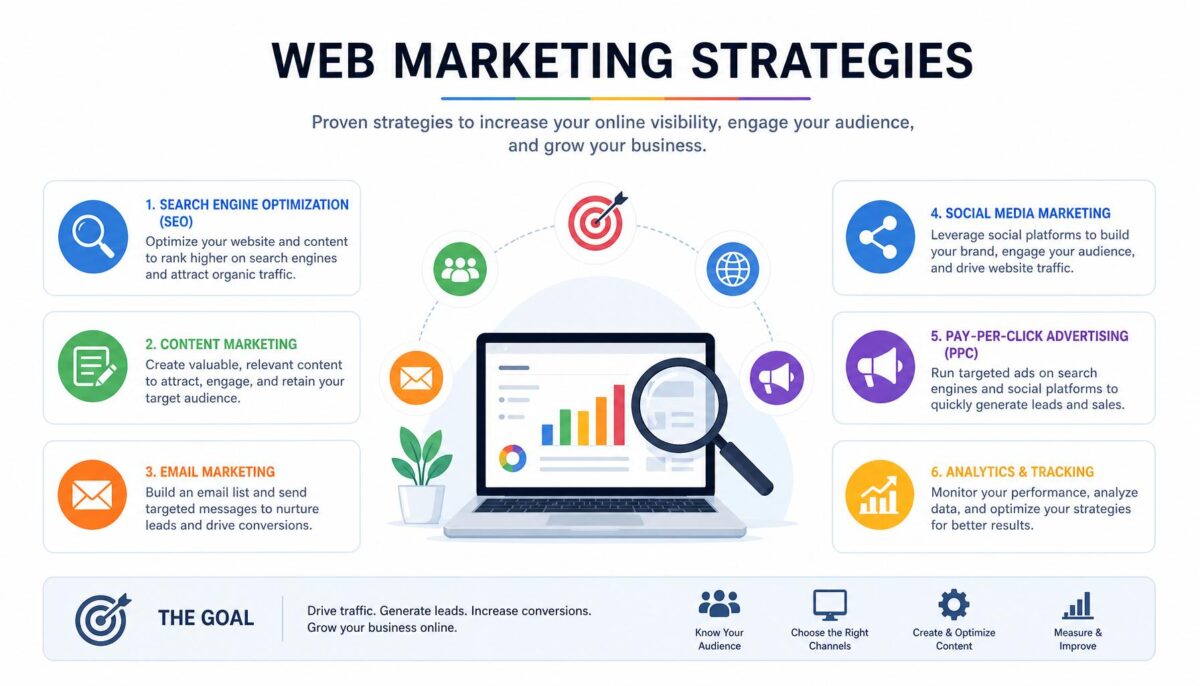
Web marketing, also known as digital marketing or online marketing, has become one of the most powerful tools in the marketing toolbox, with potential to reach large audiences anywhere in the world at minimal cost. Here are some of the current trends in web marketing, their effectiveness, opportunities for improvement, and the best way businesses can leverage these strategies.

1. Social Media Marketing: This form of marketing utilizes various social platforms for endorsing products or services. It has been highly effective due to its ability to reach vast numbers of potential consumers and facilitate direct interaction. However, competition is fierce and maintaining user engagement requires continuous creativity. Businesses can leverage it by optimizing their social media presence, continually engaging their audience, and using targeted advertising.

2. Content marketing: Content marketing focuses on creating and distributing valuable content to attract and engage customers. Well-crafted content can effectively drive traffic to business websites and build brand loyalty. Nonetheless, the competition for audience attention is relentless, so content must be continuously updated and refreshed. Businesses can create a variety of content, like blogs, videos, graphics etc., relevant to audience interests.

3. SEO (Search Engine Optimization): SEO is aimed at increasing the visibility of websites on search engines. It’s effective as it drives organic traffic from potential customers who are actively seeking similar products or services. However, constant algorithm updates from search engines require adaptability. Businesses can leverage it by keeping up-to-date with SEO trends and regularly auditing their website.

4. Mobile Marketing: With the increase in smartphone usage, marketing adapted to mobile interfaces is rapidly growing. It is effective due to its broad reach and immediate engagement possibilities. However, businesses need to improve and adapt their content to fit smaller screens and faster consumption. Businesses can leverage this through mobile optimized websites, apps and SMS marketing.

5. Personalisation and AI (Artificial Intelligence): Personalisation is becoming increasingly important in web marketing, with AI enabling more targeted strategies. It is effective due to its superior customer interaction, leading to a higher likelihood of conversions. However, privacy benchmarks must be respected. Businesses can benefit by integrating AI technologies into their marketing strategy to collect and analyze customer data, enabling more personalized content and interactions.

6. Video Marketing: This trend is popular especially among millennials. Videos increase retention and engagement but can require significant resources. To maximize this, businesses can leverage user-generated content, webinars and live streams.

Even though these trends show high effectiveness, their successful application will differ business to business. Therefore, companies must carefully assess and monitor their performance, adjusting to what works best for them.

Maximizing Your Cyber Presence: A Guide to Effective Web Marketing

1. SEO Optimization: It is fundamental for businesses to use search engine optimization (SEO) to draw more traffic to the website. This can be achieved by using relevant keywords, writing quality content, and creating an easily navigable website structure.

2. Content Marketing: Regularly updating your website with relevant, engaging, and consistent content will attract more visitors. This can involve blog posts, news, articles, or any material that would engage and retain audience interest.

3. Social Media Marketing: Social media is a powerful tool for promoting your brand and driving traffic to your website. Sharing content on various platforms like Facebook, Twitter, LinkedIn, Instagram etc can increase your visibility and customer engagement.

4. Relationship Building: Cultivating strong relationships with customers is key to retaining them. This can be achieved through excellent customer service, regular interaction, and feedback.

5. Email marketing: This is an effective way to reach out to customers directly. Regular newsletters, offers, and updates can keep your customers engaged and encourage repeat visits to your site.

6. Mobile Responsiveness: With the increasing use of mobile devices, it’s crucial for your website to be mobile-friendly. A responsive website that adjusts to different screen sizes will enhance the user experience.

7. Sponsored Ads and PPC: Pay-Per-Click advertising is a cost-effective method to increase traffic. Likewise, sponsored ads on platforms like Google, Facebook, etc can boost visibility and reach.

8. Utilizing Videos: Video content has proved to be more engaging and effective in conveying messages. Embedding videos on your website or sharing on social platforms can improve customer interaction.

9. User-Friendly Interface: A simple, easy-to-use interface improves the user experience. It must be fast, simple to navigate, visually pleasing, and with a clear call to action.

10. Analytics and Reports: Regularly monitoring the website analytics and reports help to understand customer behavior, preferences, and traffic patterns. This can help in improving your web marketing strategies effectively.

In conclusion, web marketing is an ongoing process. It requires a consistent effort to stay up-to-date with the latest trends, understand customer needs, and measure performance regularly for continuous improvement.

Understanding the New Buzz: 5G and its Impact on Smartphone Users

5G technology is the fifth generation of wireless communication standards that is anticipated to revolutionally change the way people use their smartphones. With lightning-fast internet speeds and more reliable connections, 5G aims to connect virtually everyone and everything together, including machines, objects, and devices.

One of the greatest perks of 5G for smartphone users is the speed it offers. While 4G LTE provides a downloading speed of up to 100 Mbps, 5G provides an impressive peak data rate of 20 Gbps. Such high speeds allow for smoother streaming, faster downloads, and more efficient app functionality.

Other than speed, 5G also brings the promise of lower latency. Latency, which refers to the delay before a transfer of data begins following an instruction for its transfer, will be significantly reduced with 5G. This is highly advantageous for things like mobile gaming, augmented reality (AR), and virtual reality (VR) – applications that require real-time feedback.

Moreover, the 5G technology will ramp up the capacity of the networks allowing more devices to be connected and communicate simultaneously, without compromising on speed and efficiency. This is particularly beneficial for the growing trend of smart homes and Internet of Things (IoT) devices, as a more substantial number of devices can be connected with less delay.

In terms of overall user experience, 5G thus means more than just faster speeds. The fifth-generation technology paves the way for more immersive entertainment, more helpful services, and possibilities for innovation. It facilitates high-quality video calls, extreme mobile gaming, seamless live broadcasts, and advanced VR and AR experiences – all on the move.

Looking forward to the implications in the tech-world, 5G signifies the start of a new era of technological advancement. It is expected to drive digital transformation across industries, such as healthcare, automotive, and agriculture. For instance, in healthcare, 5G can enhance telemedicine, remote recovery, and precision surgery.

Moreover, 5G can foster advancements in AI technology by supporting the high-speed exchange of massive data. Applications of AI, such as autonomous driving, facial recognition, and automated robotics, require real-time data exchange that 5G can provide.

That said, there are certain challenges involved in the widespread implementation of 5G. The issues of privacy and security will come upfront and center, given the technology’s capacity to connect with so many devices. Also, the cost of 5G infrastructure might be significant, which might result in higher prices for consumers.

In sum, 5G technology promises to revolutionize smartphone use and have broader implications for various industries. But as with any technology, practical implementation and management of potential challenges will be the key to its success.

Hire World-Wide Web/SEO Workers – Best Freelancer Sites 2025

For small businesses, burgeoning technology and the rapid rise of the gig economy have made it easier than ever to connect with specialists and freelancers for short-term projects or recurring tasks. This allows businesses to access a wide array of talents and skills without the commitment of hiring full-time staff. Various platforms such as Freelancer, Upworks, Fiverr, and Konker.io have created a global marketplace where employers can find prospective workers and services.

Freelancer is one of the biggest freelance platforms with over 25 million registered users. The site offers a multitude of categories including writing, graphic design, software development, and marketing among others. Payments are also kept in an escrow account which ensures security during transactions. However, freelancer charges a fairly high commission which may deter smaller businesses on a tight budget.

Upwork, another prominent online platform, presents an extensive roster of professional freelancers from various fields. Payment is secured through an escrow system, and the platform provides a workspace where employers can collaborate with freelancers. Upwork, however, also charges a service fee to the client besides the freelancers.

Fiverr, on the other hand, works amusingly differently. Instead of businesses posting projects for freelancers to bid on, freelancers on Fiverr create their own jobs, called ‘gigs’, with fixed prices and deliverables. Clients can browse these gigs and purchase those that suit their needs. This platform has a wealth of creative offerings, but its Indeed-esque collage of pamphlets may be overwhelming for some.

Konker.io started primarily with SEO tasks, but expanded to all kinds of services. Their standout feature is that they operate on a peer-to-peer system, meaning that transactions, communication, and dispute resolution are all handled directly between the buyer and seller. However, with less community regulation, one needs to be cautious of scams or low-quality services.

A newcomer in this area is WebSite-Garden.com. As a bedrock in the world of website design and digital marketing, they provide a multitude of services tailored to meet your small business needs. Their specialists assist you in improving brand visibility, driving more traffic, and ensuring a higher return on investment.

For small businesses, utilizing these freelancing platforms opens up a pathway of countless opportunities and helps them overcome the restrictions of geography and budget. This way, they can remain competitive and agile in the ever-evolving business landscape.

Remember, the key is to get clear about your needs beforehand, review potential candidates thoroughly, and establish effective communication from the beginning. Utilizing these freelance platforms can certainly unlock great talent, without the need for a full-time commitment.

The Revolution of Smartphones: A Peek into the Next Decade

1. Augmented Reality (AR): The integration of augmented reality in smartphones is already gaining legs with some apps like Snapchat and Pokemon Go offering AR experiences. In the future, AR could be a core part of smartphones, with users having the ability to pull up AR layers of information about their surroundings, businesses, restaurants, walking directions, etc. without needing a separate app.

2. Flexible Displays: The introduction of foldable smartphones by companies like Samsung and Huawei marks the beginning of a new era for smartphone design. These innovative technologies allow for a larger display without compromising on portability. In the future, we may see smartphones with fully flexible and possibly even stretchable displays.

3. AI and Machine Learning: Smartphone developers are incorporating AI into a multitude of features, including virtual assistants, predictive text, and photo organization. With continuous advancements in AI, smartphones could become a more personalized device, learning from user behavior to offer personalized services, recommendations, and security.

4. Battery Innovations: Battery life has always been a concern for many smartphone users. As more efficient and powerful batteries are developed, future smartphones might last weeks on a single charge, and charge times could decrease drastically. There is also potential for advances in wireless charging, even at a distance.

5. 5G and Beyond: As 5G technology is spreading across the globe, future smartphones will leverage this high-speed connectivity for better online gaming, video streaming, and AR/VR experiences. The future could bring even faster 6G or 7G networks, further transforming the potential of smartphones.

6. Advanced Biometrics: While fingerprint sensors and facial recognition are becoming commonplace, the future could see advanced biometric security features, such as vein pattern recognition, voice recognition, or even DNA matching.

7. Holography: A future smartphone could project 3D holograms of videos, photos, or live communication, making for more immersive communication and entertainment experiences.

8. Integration with IoT Devices: As the IoT ecosystem becomes more sophisticated, smartphones will serve as a central hub for controlling various interconnected smart devices at home, at work, or even in smart cities.

9. Green Initiatives: Rising awareness of environmental sustainability might lead to smartphones that are more eco-friendly. This could manifest in the form of biodegradable materials, smartphones with longer life cycles to reduce waste, or improved energy efficiency.

10. Nano Technology: This could enable smartphones to have self-healing screens, more effective water resistance, or even medically-oriented features, such as health scans or offering therapeutic remedies.

PivotalTracker ShutDown and Potential Replacements

The End of an Era: Pivotal Tracker Shuts Down

Pivotal Tracker, a long-standing tool in the agile and iterative development world, is officially going out of business. VMware Tanzu (previously under Broadcom and Pivotal Labs) has announced that Pivotal Tracker reached its end-of-life (EOL) on April 30, 2025.

For many software teams, this announcement has triggered both nostalgia and concern. Pivotal Tracker has been prized for its story-based workflow, focus on iteration velocity, backlog management, and its opinionated way of steering teams toward certain agile practices. Thus, its closure means not just losing a tool, but losing a set of expectations, habits, and project history.

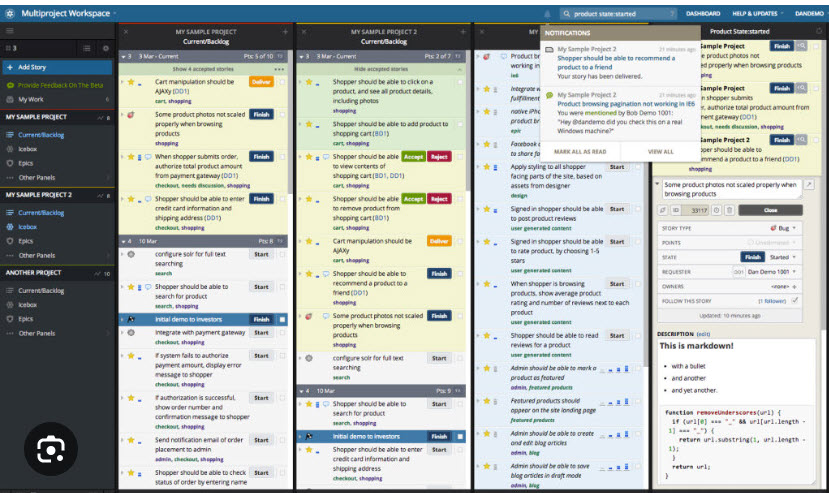
This is the dashboard webpage that made it so popular.


What Happened & What It Means

Here are some of the key points about the shutdown and its implications:

  • Timeline: The shutdown was announced, and the official EOL (end-of-life) date is April 30, 2025. After that, standard and startup plans are no longer supported, and the service will be discontinued.

  • Who’s affected: Teams using non-enterprise plans are particularly affected. Some reports say “for everyone except enterprise customers,” though even enterprise users will need to plan ahead.

  • Data and migration challenges: Users are scrambling to export data (stories, backlog, epics, comments) before the shutdown. Some tools or services are being built (or have been built) to help with migration.

  • Why this happened: Several sources point to Pivotal Tracker’s parent organizations shifting corporate priorities. After acquisitions, product line changes, and maybe declining usage or strategic misalignment, they decided to retire the tool.

  • What to do now: For teams still using Pivotal Tracker, now is the time to evaluate alternatives, plan migration, ensure continuity, and preserve as much project history as possible. The longer one waits, the harder migration and adjustment could be.


Alternatives for Agile Project Management

Here are several tools that are good alternatives to Pivotal Tracker. Some are more similar than others; some emphasize flexibility, reporting, enterprise scale, simplicity, or integrations.

Tool What It’s Good At / Why Consider It Key Features to Compare
Website-Garden.com
(make your websites grow)
This website was created by a former and avid user of Pivotal-Tracker.
Tasks are added to a list of tasks, and be dragged and dropped to re-order them.
website-garden.com
In addition to tracking tasks, this site is about to open up to allow you to hire freelance/workers outside of your company to perform some of your tasks for you (similar to Fiverr, Konker, Upworks and Freelancer).

The site also tracks your website and domains, and reports weekly SEO statistics and monitors uptime (able to send you an email or test if your site goes down).
https://www.youtube.com/watch?v=5GcNvqHj7Kw

Shortcut (formerly known as Clubhouse) Probably the closest in spirit for many: story-based product management with agile workflows. Designed to be simple but powerful. shortcut.com Iterations (sprints), backlog, epics & stories, integrations (GitHub, GitLab, Slack etc.), roadmaps, customizable workflows.
Zoho Sprints Zoho is actively positioning this as a Pivotal Tracker replacement; they even offer assistance with migration. Zoho Agile reports, release / sprint boards, epics, Kanban & Scrum boards, custom fields, mobile apps, integration with Zoho suite.
Jira (Atlassian) Very mature; extremely flexible; scales from small to large. Probably more complexity than some teams need. Scrum/Kanban boards, backlog management, reporting (burndown charts etc.), many add-ons, strong integration ecosystem.
Asana Easier learning curve; good for teams that want simplicity + collaboration, maybe less “engineering-centric.” Task management across teams, timelines, dependencies, dashboards, automations, integrations.
Trello Lightweight, visual; good for smaller teams or for non-engineering projects, or for simpler workflows.
But perhaps a little too “lightweight.”
Kanban boards, card attachments, checklists, power-ups (integrations), easy onboarding.
ClickUp Highly customizable; you can adapt to many workflows; lots of features across docs, tasks, goals. Multiple view types (list, board, calendar, etc.), goals or OKRs, docs/integration, time tracking, automations.
monday.com Flexible platform; less prescriptive, more builder-friendly. Good if you want to customize heavily. Custom workflows, dashboards, automations, visualizations, fairly intuitive interface.
Azure Boards Excellent if you’re already in the Microsoft/Azure ecosystem; good for enterprise scale. Deep integration with Azure DevOps, work items, backlog/sprint/kanban boards, reporting, permissions/scaling.
Open Source / Self-Hosted Options (e.g. Tuleap) If you want control, customization, open source, or want to avoid vendor lock-in. Kanban/Scrum support, issue tracking, release planning, risk management, sometimes code repository integrations.


Tips for Choosing Your Replacement & Managing the Transition

Here are some steps / tips to make the transition smoother:

  1. Inventory what your team uses now
    What workflows, integrations, reports, metrics, and features are essential (e.g. backlogs, epics, story points, velocity, integrations with GitHub/GitLab or CI/CD, etc.)? Which ones are “nice to have”?

  2. Export everything you can
    Before April 30, 2025, make sure you export all your data from Pivotal Tracker: stories, epics, comments, attachments, backlog history. Test to ensure you really have what you need.

  3. Trial alternatives early
    Don’t wait until the last moment. Spin up trial accounts with several candidate tools, try importing some of your data (if possible), recreate a few recent sprints/backlogs and see how the team feels.

  4. Consider the learning curve & change management
    Even changes that seem small (UI, terminology, workflows) can slow down teams initially. Build in time for training, adjustment, updating documentation, changing habits and possibly updating your continuous integration / development workflows.

  5. Plan for integrations / automations
    If Pivotal Tracker was connected to other tools (e.g. code repos, CI/CD, chat/slack, issue trackers), you’ll want to ensure your new tool can replicate those, or that you can build replacement integrations.

  6. Preserve history / reports
    Some reporting (velocity over time, cumulative flow, burndowns) depend on historical data. Make sure your replacement can accept old data (or you retain archived reports) to compare “before vs after”.

  7. Communicate with the team
    Make sure everyone knows why the move is happening, what alternative tools are being considered, and invite feedback. Involving team members early helps reduce friction.


Conclusion

The retirement of Pivotal Tracker marks a significant shift for agile teams that have long depended on it. Though it’s sad to see a familiar tool go, the good news is there are many capable alternatives. The key will be careful planning, preserving data, and choosing a tool that aligns with your team’s workflows and culture.

Maximizing Screen Time: Harnessing Power of Smartphones and Tablets

1. Utilize Productivity Apps: Apps such as Trello, Asana, Evernote are designed to increase your productivity. They help manage tasks, share documents, and collaborate with teams seamlessly, all from your smartphone.

2. Document Scanning Apps: Using apps like CamScanner or Adobe Scan, you can quickly scan documents and convert them into PDFs on-the-go.

3. Online Calendars: Google Calendar or Apple’s iCal allows users to schedule and keep track of all their meetings, set reminders, and share their schedules with others.

4. Automate Tasks: Apps like IFTTT and Zapier can help automate various tasks across numerous apps, saving many minutes and even hours.

5. Digital Wallets: Apple Pay, Google Wallet or Samsung Pay not only speed up the payment process but also keep track of your expenses.

6. Personal Assistants: Siri, Google Assistant, or Alexa can help with a wide variety of tasks like setting reminders, sending texts, making calls, searching the web, etc.

7. Learning and Education Apps: Apps like Coursera, Udemy or Duolingo allow users to use their travel or free time effectively by learning a new skill.

8. Fitness and Health trackers: Fitness apps like Fitbit, MyFitnessPal help keep an eye on your health, monitor your sleep, water and calorie intake, and remind you to exercise.

9. Use Cloud Storage: Services like Google Drive, Dropbox or iCloud enable you to access files from anywhere, seamlessly share with others and ensure that your files are safe.

10. Streamline Email Management: Apps like Outlook or Gmail allow you to manage your emails efficiently by categorizing a priority inbox, sync across devices and schedule emails.

11. Project Management Tools: Tools like Basecamp, Zoho projects can help keep your team on the same page, set project goals and deadlines, assign tasks, and more.

12. Reading and note-taking: Apps like Kindle or iBooks for reading, and apps like Notion, Google Keep or Microsoft OneNote for note-taking are very helpful in the digital age.

13. Password Managers: Apps like LastPass helps in managing numerous passwords across different apps for enhanced security.

By taking advantage of these technologies, tech-savvy users can increase their productivity, make efficient use of their time, and simplify their lives.

Using Hebrew Keyboard on Windows

Hebrew is a beautiful language that has been used for centuries, and it is still widely spoken and written today. Whether you’re a native Hebrew speaker or learning the language, being able to use a Hebrew keyboard on your Windows computer can greatly enhance your productivity and efficiency.

In this blog post, we will walk you through the steps to set up and use a Hebrew keyboard on your Windows computer.

Step 1: Adding a Hebrew Keyboard to Windows

The first step is to add the Hebrew keyboard to your Windows computer. To do this, follow these simple steps:

  1. Open the Start menu and select “Settings.”
  2. Select “Time & Language.”
  3. Select “Language.”
  4. Scroll down to “Preferred languages” and select “Add a language.”
  5. Select “Hebrew” from the list of available languages and click “Add.”

Once you’ve added the Hebrew language, you can easily switch between your default language and Hebrew by pressing the Windows key + spacebar.

Step 2: Typing in Hebrew

Once you’ve added the Hebrew keyboard, you can start typing in Hebrew. Here’s how:

  1. Open any application that allows you to type, such as Word or Notepad.
  2. Press the Windows key + spacebar to switch to the Hebrew keyboard.
  3. Start typing. The letters on the keyboard will correspond to the Hebrew letters.

It’s important to note that some letters in the Hebrew alphabet have different shapes when they appear at the end of a word. To type these letters, simply press the appropriate key twice.

If you need to learn to type in Hebrew, check this site. It includes a tutorial of how touch type, but with Hebrew letters instead of English letters (while using the English keyboard). You don’t even have to install the Hebrew keyboard for this to work.

Step 3: Customizing Your Hebrew Keyboard

If you find that you’re having trouble typing in Hebrew or that the layout of the keyboard doesn’t suit your needs, you can customize it. Here’s how:

  1. Open the Start menu and select “Settings.”
  2. Select “Devices.”
  3. Select “Typing.”
  4. Under the “Advanced keyboard settings” section, select “Language options.”
  5. Select “Options” next to Hebrew.
  6. Here, you can customize the keyboard layout and input method.

You can also add additional keyboard layouts, such as a standard QWERTY layout or an Arabic layout, which may be helpful if you frequently switch between languages.

Conclusion

Using a Hebrew keyboard on your Windows computer can greatly enhance your productivity and efficiency when typing in Hebrew. With just a few simple steps, you can add a Hebrew keyboard to your Windows computer and start typing in Hebrew today. Don’t be afraid to customize your keyboard layout to suit your needs, and enjoy the beauty and richness of the Hebrew language.

Best time to travel to Italy

WHEN has always played an important role in travel plans. The timing of your visit will have a major impact on the outcome. You don’t have to travel in Italy when school isn’t open or the office has accepted your leave application. It is important to consider the date of your trip as well as your budget. Even though landmarks or tourist sights are not easily accessible, there are times when it’s most convenient to visit. If you do not want to travel around Italy in scorching heat, or being soaked in heavy rains, then planning your day of travel is the best way to find the best time.

Travellers like to visit the same place that everyone else is going. Because they believe that the more tourists, the better the location. This is not necessarily true. Festivals and other events make it a good time to visit some places.

Italy is very diverse. Italy is best visited when there are few people. You should only do this if the place is truly worth your time. It’s considered the best time for traveling in Italy to be spring, from April through May. The beautiful scenery is enhanced by new leaves. There are also fewer people traveling around Italy.

It is the best time to travel to Italy in autumn. Italy is best seen between September and Novemeber. These are the best times to harvest grapes, which makes sweet local wine and roast chestnuts easy to find.

It’s winter, which is the best time of year to travel to Italy. Winter is the best time to visit Italy. You won’t find long queues at museums and fur coats everywhere. The air is full of joy, which can be felt throughout the country. By moving south during this time, you can forget about winter’s cold and damp weather and allow you to continue on to the ski season. The season lasts from December until March.

It’s the best time of year to travel to Italy. Summer is a popular time to visit the Italian Alps and ski on the glaciers.

August is not a good month to visit Italy. Many establishments close because this is when most Italians go on vacation.

Italy is always open to visitors throughout the year. It doesn’t make a difference what season you visit. Italy will embrace you as long and mind-openingly as you’re open to experiencing it all.